DNS Record Types Explained
Aspiring Full-Stack Developer
What is DNS?
It is
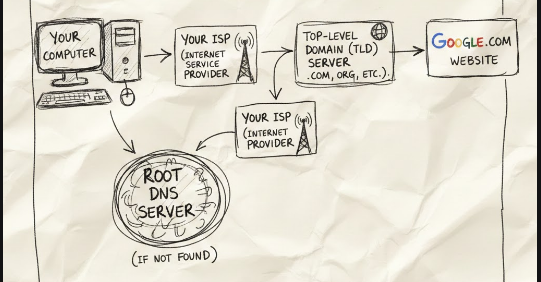
Domain Name System.It is a phone book of IP Addresses with their Name to lookup for.
HTTP takes url of the website and it tries to look for its IP Address and connect to it.
Its a Database of IP Addresses.
This Database of IP Addresses is divided into various classes.
In the url
mail.google.com,mailis the subdomaingoogleis sublevel domain andcomis the top level domain.First HTTP looks at the
top level domainorroot DNS server.These are managed by
ICANN(Internet Corporation for Assigned Name and Numbers).When we visit a website for the first time on the device, it will save the website's IP Address on the browser so it will not be looking at the server again for the same website.
If the website is not found locally, then it will look on the local DNS Server.
We can only rent a domain name, we cannot own it.
What is IP?
This is known as
Internet Protocol.The actual hopping of packets from one router to another happens over ISPs.
These routers have a Networking Table where there are IP Addresses available to know which packet should be sent to what address.
The IP Addresses are not actually the entire IP Address but some part of it is given there. For example, the IP Address of a device is
192.168.1.1, so on the router's networking table there will be few blocks of this IP Address but not the entire address. This is known asSubnetting.In the IP Address
192.168.1.1, the blocks192.168.1is the Subnet ID and1at the end is the host ID.Whenever a packet is forwarded by a router, it only has the subnet ID and not the host ID. The packet after reaching to the correct router, the router uses
DHCPto send the packet to correct device.
IPv4 VS IPv6?
IPv4
This is
32-bitaddress.Using IPv4, we can make 2^32 IP Address.
Ex.
192.168.1.1.
IPv6
These are
128-bitaddresses.There can be 2^128 IPv6 Addresses => 3.4 * 10^38 IP Addresses.
This IP Address is not backward compatible with IPv4, and IPv4 hosts and routers will not be able to deal directly with IPv6 traffic and vice-versa.
Why everyone has not moved to IPv6 yet?
Not having backward compatibility is one issue here.
All ISPs need to shift to IPv6.
Hardware should be made compatible for IPv6.
Why do we need DNS records?
The internet doesn’t understand domain names like mycompany.com.
It only understands IP addresses.
DNS exists to translate human friendly names into instructions the internet can follow.
let undrstand it with using Email example.
https://help.instantly.ai/en/articles/7916985-why-do-i-need-dns-records
What happens when someone sends you an email?
Let’s say your email is:
namaste@mycompany.com
When someone clicks Send, their email server asks a very basic question:
“Where should I deliver emails for mycompany.com?”
This answer does not live inside Gmail, Outlook, or your inbox.
It lives in DNS.
MX record > tells where emails should go
An MX record tells the world which mail server handles your emails.
mycompany.com → MX → Google mail servers
SPF > who is allowed to send emails
SPF is a DNS record that answers another question:
“Is this server allowed to send emails for this domain?”
Example:
Only Google can send emails for mycompany.com
DKIM > proves the email wasn’t changed
DKIM adds a digital signature to emails.
It helps receiving servers verify:
The email is real
The content wasn’t modified in between
This record also lives in DNS.
DMARC > what to do if something looks fake
DMARC tells mail servers what to do when an email fails security checks.
For example:
Put it in spam
Reject it
Or allow it
Again controlled via DNS.
Here are the 8 most commonly used DNS Record Types.
A (Address) Record
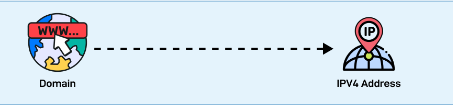
Maps a domain name to an IPv4 address. It is one of the most essential records for translating human-readable domain names into IP addresses.
CNAME (Canonical Name) Record
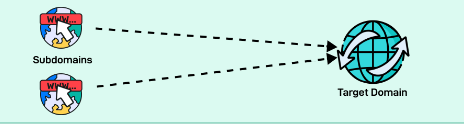
Used to alias one domain name to another. Often used for subdomains, pointing them to the main domain while keeping the actual domain name hidden.
AAAA Record
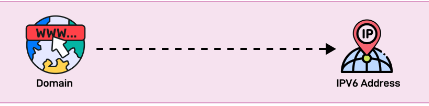
Similar to an A record but maps a domain name to an IPv6 address. They are used for websites and services that support the IPv6 protocol.
PTR Record
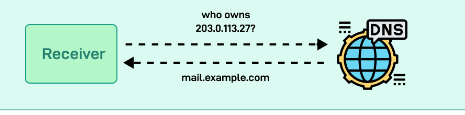
Provides reverse DNS lookup, mapping an IP address back to a domain name. It is commonly used in verifying the authenticity of a server.
MX Record
Directs email traffic to the correct mail server.
NS (Name Server) Record
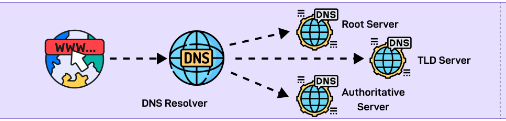
Specifies the authoritative DNS servers for the domain. These records help direct queries to the correct DNS servers for further lookups.
SRV (Service) Record
SRV record specifies a host and port for specific services such as VoIP. They are used in conjunction with A records.
TXT (Text) Record
Allows the administrator to add human-readable text to the DNS records. It is used to include verification records, like SPF, for email security.